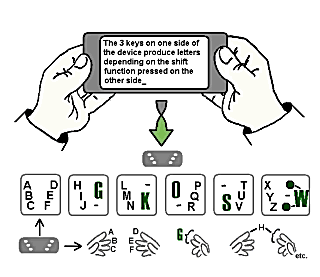
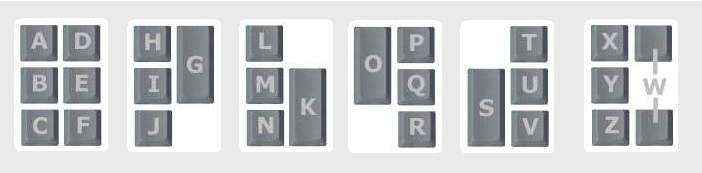
Letters (Alphabetical Layout)
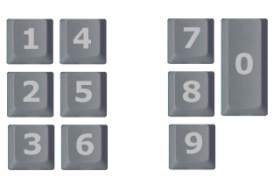
Numbers
Native characters >> - Shortcuts >> - Table for application development >> - Letter Frequency Layout>>
The complete GKOS character set
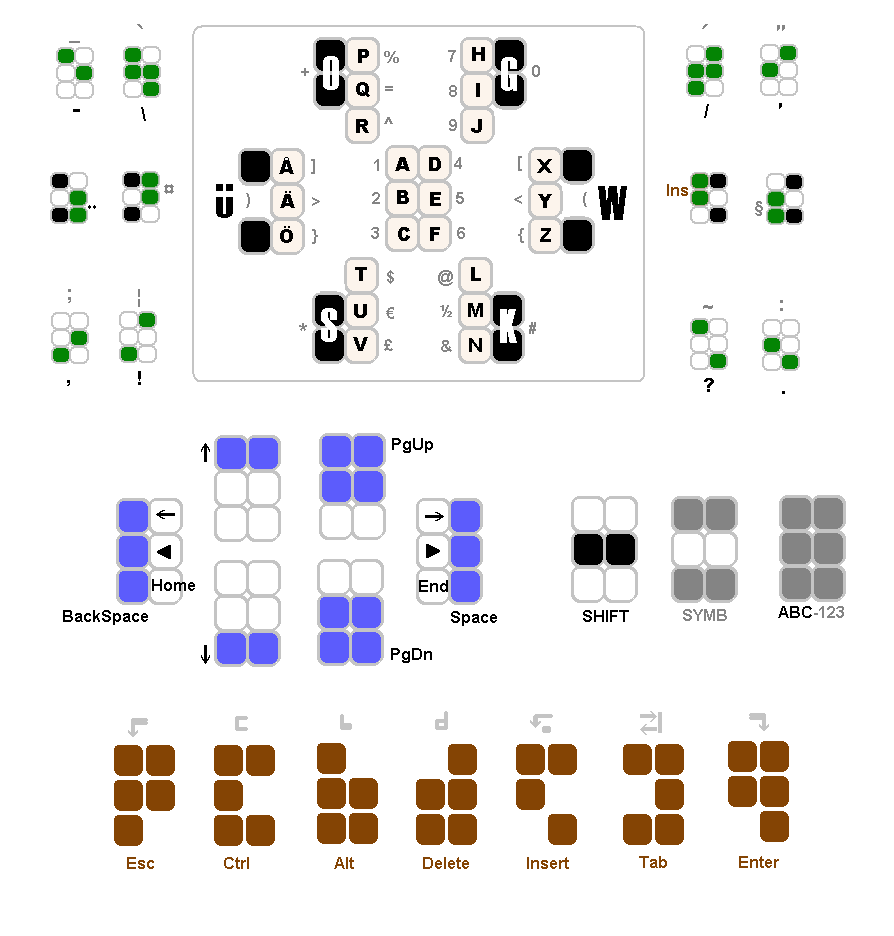
Each black 2-key combination above is a shift function to obtain the rest of the letters in each group, or just produces the letter marked on it when pressed alone.
- The ABC-123 mode change toggles between the two character sets (black and grey) inside the frame shown above.
- With SYMB, single characters can be picked from the parallel set, also outside the frame. For example, colon (:) is obtained by pressing SYMB before period (.).
The main principle is that for frequently used characters, only 1 to 3 simultaneous key presses are needed but for functions more. This way typing is lighter and functions will not be activated by mistake if typing carelessly.
- SHIFT is mainly for capitalizing but when the character is not a letter, the effect is the same as with SYMB by default. Two consecutive SHIFTs set CAPS LOCK on and one more turns it off. One SHIFT has an effect on one character only.